
Checking your EPF balance is now simple and convenient. EPFO members can view their PF balance through multiple online and offline methods without visiting an EPFO office. You can check your EPF balance using the EPFO Member Portal, EPFO Passbook, SMS service, missed call facility, or the UMANG app.
“How to check EPF balance?” is a common question among EPF account holders. As a member of the Employees’ Provident Fund Organisation (EPFO), you can keep track of your provident fund contributions and available balance at any time.
Employees can check their EPF/PF balance using both online and offline options. Online methods include accessing the EPFO Member Portal or Passbook through a mobile phone or computer and checking the balance through the UMANG app. For offline access, members can use the EPFO SMS service or missed call facility from their registered mobile number.
These options make it easier for employees to monitor their PF contributions and stay updated on their EPF account balance.
How to Check EPF Balance Online and Offline?
There are several ways to check your EPF/PF balance, both online and offline. EPFO members can use services such as SMS, missed calls, the EPFO portal, and the UMANG app, depending on their account details and UAN status.
1. Check EPF Balance via SMS
EPFO members can check their PF balance through SMS using their registered mobile number. To receive your EPF balance details, send an SMS in the prescribed format to 7738299899.
For example:
| Language | Code | Language | Code |
|---|---|---|---|
| English (Default) | ENG | Hindi | HIN |
| Gujarati | GUJ | Punjabi | PUN |
| Marathi | MAR | Kannada | KAN |
| Malayalam | MAL | Tamil | TAM |
| Telugu | TEL | Bengali | BEN |
EPFOHO UAN → Send to 7738299899
The response is generally provided in English by default. If you prefer to receive the information in another supported language, add the relevant language code to the SMS.
For example:
- Hindi: EPFOHO UAN HIN
- Marathi: EPFOHO UAN MAR
- Bengali: EPFOHO UAN BEN
Send the SMS to 7738299899 from your registered mobile number.
Important Requirements
The SMS facility can be used when your UAN is active and the required KYC details are linked to your EPF account. These generally include your Aadhaar, bank account, and PAN details.
If your UAN is not activated or your KYC details are incomplete, you may need to complete the UAN activation and e-KYC process before using the EPFO SMS service.
2. How to Check PF Balance Through Missed Call
EPFO members can also check their PF balance through the missed call service. This method is convenient for checking your latest PF contribution and account balance without logging in to the EPFO portal.
To use the service, give a missed call from your registered mobile number to the EPFO PF balance enquiry number: 996604442 After the missed call, you can receive details related to your latest EPF contribution and available PF balance on your registered mobile number.
Requirements for EPF Balance Check by Missed Call
Before using the EPFO missed call facility, make sure the following conditions are fulfilled:
- Your UAN must be activated.
- Your mobile number must be registered with your UAN. The missed call should be made from the same registered mobile number.
- Your UAN should be linked with the required KYC details, including Aadhaar, PAN, and bank account.
- Your EPF account should have the necessary details updated with EPFO.
Once these requirements are completed, you can use the missed call facility to conveniently check your PF balance without logging into the EPFO portal.
3. Check EPF Balance Using the EPFO Portal
EPFO members can conveniently check their EPF balance online through the official Employees’ Provident Fund Organisation EPFO Portal. By accessing the EPF Member Passbook service, you can view your account balance, contribution details, and download your passbook.
Steps to Check EPF Balance Online Through the EPFO Portal
- Visit the official EPFO website at www.epfindia.gov.in.
- On the homepage, go to the ‘Services’ section and select ‘For Employees’.
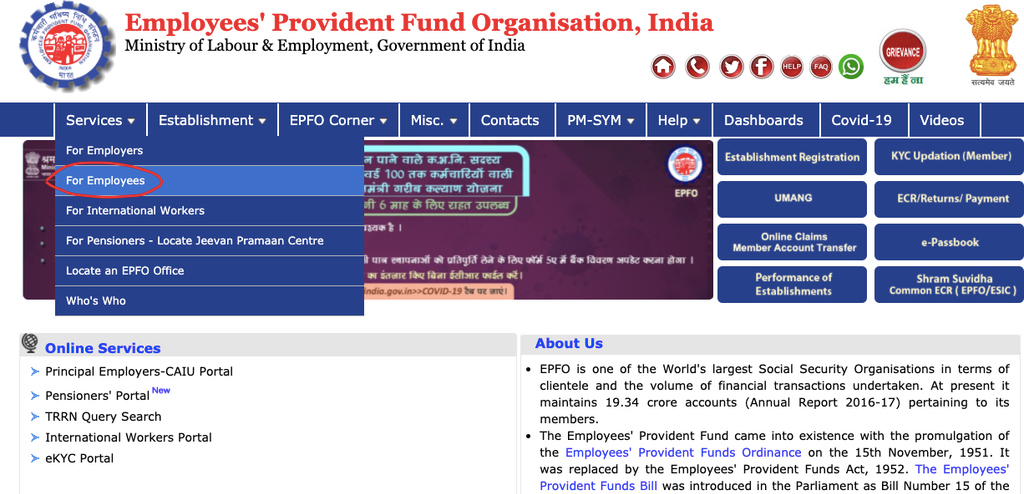
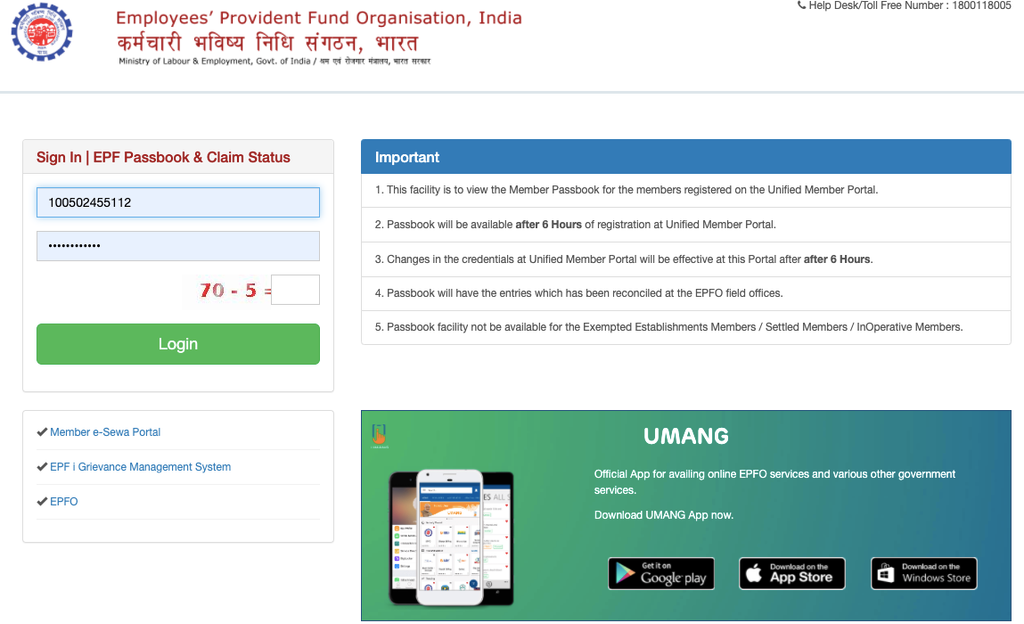
- Under the available services, click on ‘Member Passbook’. You will be redirected to the EPFO Member Passbook login page.
- Enter your UAN and password to log in. Complete the required verification using the OTP sent to your registered mobile number, if prompted.
- After successful login, open the ‘Passbook’ section and select the required Member ID linked to your UAN.
- Your EPF passbook will appear on the screen, showing your contributions and available balance. You can also download or save the EPF passbook in PDF format for future reference.
4. How to Check EPF Balance on the UMANG App?
UMANG (Unified Mobile Application for New-Age Governance) is a Government of India mobile application that provides access to several government services in one place. EPFO members can use the UMANG app to check their PF balance, view their passbook, track claim status, and access other EPFO services.
If you have an active UAN and registered mobile number, you can check your EPF account details through the app by following these steps:
Steps to Check EPF Balance Using UMANG
Step 1: Download and install the UMANG app on your smartphone. Register using your mobile number and OTP. Existing users can simply log in. You can also set a 4-digit M-PIN for quicker access.
Step 2: Open the app and search for ‘EPFO’ using the search bar. Select EPFO from the search results.
Step 3: Under Employee Centric Services, find and select the ‘View Passbook’ option.
Step 4: Enter your 12-digit UAN and select ‘Submit’. Complete OTP verification if prompted.
Step 5: The app will display the EPF accounts or Member IDs associated with your UAN. Select the organisation or Member ID for which you want to view the details. You can check your total EPF balance, employee contribution, employer contribution, pension contribution, and applicable withdrawal entries.
Step 6: Scroll down to view the available download option and tap ‘Download’ to save your EPF passbook or account details for future reference.
5. How to Transfer Your EPF Balance to a New Account?
When you change jobs, you can either withdraw your existing EPF balance or transfer it to the EPF account associated with your new employer. Transferring the balance is generally a better option if you continue working in EPF-covered employment, as it allows your retirement savings to remain invested and consolidated.
- When you join a new organisation, a new EPF Member ID may be created under your existing UAN. Your previous EPF balance can be transferred to this new account.
- If you withdraw your EPF balance before completing five years of eligible service, the withdrawal may have tax implications, subject to applicable EPFO and income-tax rules.
- Previously, employees generally had to initiate an EPF transfer through the UAN Member Portal or EPFO services by submitting the required transfer request.
- EPFO has introduced automatic transfer of PF accounts for eligible members changing jobs. This can reduce the need to submit a separate transfer request or form.
- The transfer can cover the applicable EPF and EPS service details/contributions, helping maintain continuity of your provident fund records.
FAQs About EPF Balance Transfer
Can I transfer my EPF balance when I change jobs?
Yes. If you change jobs and join another EPFO-covered organisation, your previous EPF balance can generally be transferred to the EPF account linked to your new employment.
Is EPF transfer better than withdrawing the balance?
For employees who continue working, transferring the EPF balance can help maintain continuity of retirement savings and service records. Early withdrawal may also have tax implications depending on the period of eligible service.
Do I need to submit a form to transfer my EPF balance?
For eligible members, EPFO’s automatic transfer facility can transfer the previous PF balance to the new account without requiring a separate transfer request.
Will my EPS amount also be transferred?
The EPF transfer process also maintains the applicable EPS service/contribution records associated with your employment.
Is UAN required for EPF transfer?
Yes, the UAN helps link your EPF accounts across different employers and enables continuity of your PF records when you change jobs.
What happens if my previous EPF balance is not transferred?
If the transfer does not happen automatically, you can check your EPF account and UAN details and use the available EPFO transfer service to initiate the process, if eligible.
Can I withdraw my EPF instead of transferring it?
Yes, withdrawal may be possible subject to EPFO rules and eligibility. However, withdrawing before completing the applicable service period can have tax consequences.
8. How can I check whether my EPF balance has been transferred?
You can log in to the EPFO Member Passbook using your UAN and check the available Member IDs and contribution details to verify the transfer.